
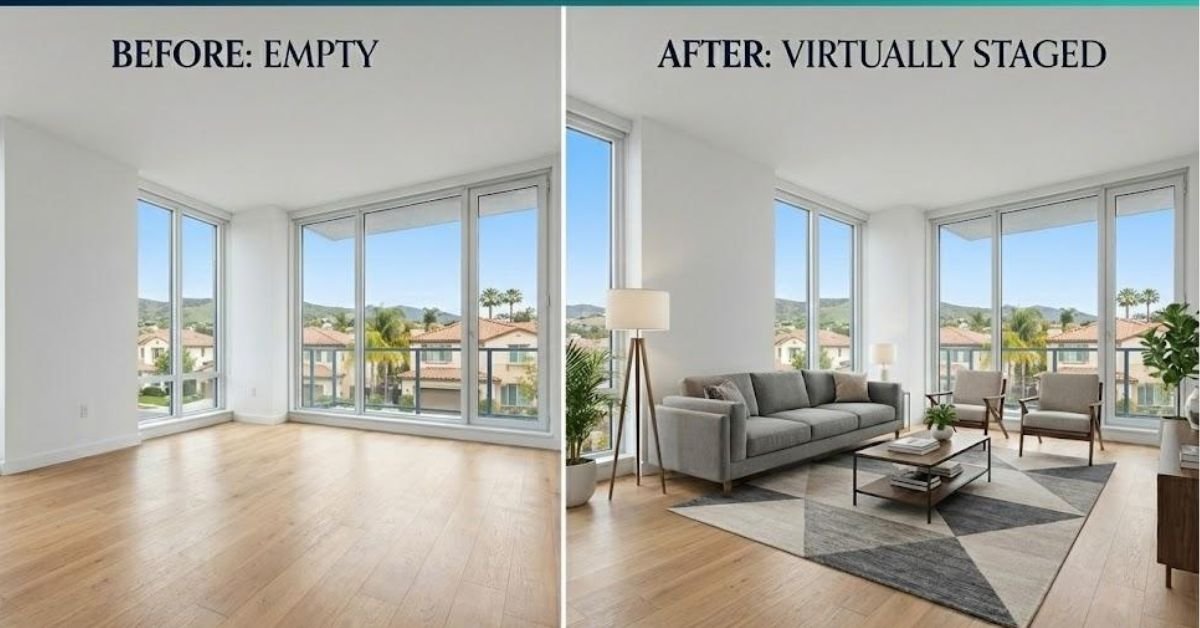
Imagine walking into an empty home with bare walls, vacant rooms, and no furniture to show you how the space could function. You might recognize its potential, but can every buyer do the same?
That is where virtual staging becomes useful. By digitally adding furniture, rugs, lighting, and décor, you can help buyers picture how a room might look and feel.
However, attractive images are only one part of successful virtual staging. If you change the architecture, hide defects, or create unrealistic proportions, your marketing can quickly lose credibility.
The best virtual staging combines visual appeal with accuracy, transparency, and buyer confidence.
Whether you are a Realtor, home builder, or real estate marketer, these practical guidelines can help you create more effective listing images without misrepresenting the property.
Why Buyer Trust Matters in Real Estate Marketing
Your listing photos often create the first impression of a property. Before buyers schedule a showing, they may scroll through dozens of images on real estate websites, social media, and listing platforms.
A beautifully staged room can encourage buyers to explore further. But what happens if they arrive at the property and discover that the room looks completely different from the photographs?
Disappointment can damage the buyer’s confidence in the listing—and potentially in you.
The National Association of Realtors’ Code of Ethics includes a general obligation to present a true picture in advertising and marketing. Specific image rules also depend on the local MLS, brokerage, and jurisdiction. citeturn0search2
Buyers Often See the Listing Before the Property
Your photos should help buyers understand the actual home, not create a fictional version of it.
Virtual staging can show where a sofa might fit or how a dining area could function. It should not suggest that the home includes furniture, renovations, or architectural features that do not exist.
Attractive Images Should Not Create False Expectations
Think of virtual staging as adding a frame to a painting. The frame can improve the presentation, but it should not change the artwork itself.
Use staging to demonstrate possibilities while keeping the property’s permanent features intact.
What Are the Best Practices of Virtual Staging?
The strongest virtual staging process follows a few essential principles:
- Preserve the original architecture and layout.
- Add realistic furniture and decorative elements.
- Avoid hiding damage or permanent defects.
- Use appropriate disclosure based on local requirements.
- Keep original photographs available.
- Review every image before publishing.
- Maintain consistency across marketing channels.
These practices help you create compelling visuals without sacrificing accuracy.
Preserve the Original Architecture and Room Layout
One of the most important virtual staging rules is simple: furnish the room you actually photographed.
Do not digitally move walls, enlarge windows, relocate doors, change staircases, or redesign the floor plan just to create a more attractive image.
Keep Doors, Windows, and Walkways in Their Original Locations
A buyer needs to understand how people move through the home. If you change the location of a doorway or remove an obstruction, the image may give the wrong impression of the property’s layout.
Check every architectural detail against the original photograph.
Maintain Accurate Room Proportions
A room should not appear larger simply because the virtual furniture is too small. Likewise, oversized furniture should not make a spacious room appear cramped.
Use furniture that matches the room’s actual dimensions and leaves believable walking paths.
Respect Existing Kitchens and Bathrooms
Do not digitally add a kitchen island, change cabinet locations, replace countertops, or install a larger bathtub unless you are clearly presenting a separate renovation concept.
Furniture and décor are different from permanent structural features. Keep that distinction clear.
Use Realistic Furniture Scale and Placement

Use Realistic Furniture Scale and Placement
Virtual staging should look like a practical interior design solution—not furniture pasted randomly into a photograph.
A sofa that blocks a doorway, a bed that fills an entire room, or a dining table with no space for chairs can make the image look artificial.
Match Furniture to the Room’s Dimensions
Before staging, examine the room’s width, length, ceiling height, and available circulation space.
For example, a compact living room may work better with:
- A two- or three-seat sofa.
- A small coffee table.
- One accent chair.
- A compact rug.
- Minimal decorative accessories.
You do not need to fill every corner. Sometimes, less furniture creates a more realistic and spacious presentation.
Follow the Camera Perspective
Furniture should follow the original photograph’s perspective. Pay attention to floor lines, wall angles, and the position of nearby objects.
If the furniture does not align with the camera angle, buyers will notice something feels wrong—even if they cannot explain why.
Create Natural Lighting and Shadows
Lighting can make or break a staged image. Furniture should reflect the direction and intensity of the existing light.
Look for:
- Natural shadows beneath furniture.
- Appropriate reflections on floors.
- Consistent brightness.
- Correct light direction.
- Realistic contact between furniture and the floor.
Small details often separate convincing virtual staging from an obviously artificial image.
Should Realtors Disclose Virtually Staged Images?
Disclosure requirements vary. Your local MLS, brokerage, state, province, and marketing platform may have different rules.
There is no single disclosure standard that applies to every real estate listing. You should verify the current requirements before uploading altered images. citeturn0search2
Even when a particular platform does not require a specific label, clear disclosure can reduce confusion and support buyer trust.
Use Clear and Visible Disclosure Language
Depending on the applicable rules, you might use wording such as:
This image has been virtually staged to illustrate furniture placement and design possibilities.
Make sure the wording accurately describes what you changed. If you altered more than furniture and décor, do not use a vague statement that could hide the nature of the edits.
Place Disclosure Where Buyers Can See It
Potential locations include:
- Directly on the image.
- In the image caption.
- In the listing remarks.
- In a social media caption.
- On a property marketing webpage.
Follow the requirements of the platform where you publish the image. A disclosure that appears in one location may not automatically carry over to another.
Avoid Small or Hidden Disclaimers
If buyers need a magnifying glass to read the disclosure, it is not serving its purpose.
Use readable text and consider how the image will appear on mobile phones, listing websites, and social media thumbnails.
Show Original Photos Alongside Virtually Staged Images
One of the most effective ways to build transparency is to show the original photograph alongside the virtually staged version.
The original image establishes what the room actually looks like. The staged version demonstrates how the space could be furnished.
Include the Unedited Room Photograph
Original images help buyers see:
- The actual flooring.
- The existing walls.
- Window placement.
- Door locations.
- Room dimensions.
- Permanent fixtures.
This comparison makes your marketing more informative and gives buyers a clearer understanding of the property.
Pair Matching Camera Angles
Use the same viewpoint whenever possible. A matching before-and-after pair allows buyers to compare the two images without struggling to identify differences.
Explain What Was Digitally Added
A short explanation can be enough. For example:
Furniture and décor have been digitally added for visualization purposes.
Keep the message straightforward. Transparency does not need to sound defensive or complicated.
Choose Staging Styles Without Misrepresenting the Property
Virtual staging gives you flexibility. You can present a room in a modern, Scandinavian, Japandi, coastal, traditional, or contemporary style.
However, the design should complement the home’s existing architecture.
Match the Style to the Property’s Architecture
A historic home may suit traditional or transitional furnishings, while a newer condominium might work well with modern or minimalist décor.
This is not an absolute rule. Creative contrast can work, but the result should still feel believable.
Avoid Using the Same Design for Every Listing
A one-size-fits-all approach can make your portfolio look repetitive. Consider the property’s location, price range, architecture, and likely buyer.
A family home may benefit from comfortable, practical furniture. A luxury condominium may suit a more refined and understated presentation.
Distinguish Staging From Renovation Concepts
Adding a sofa is staging. Replacing the kitchen cabinets or changing the flooring is a renovation concept.
If you show renovation ideas, identify them clearly so buyers do not confuse proposed improvements with existing property features.
Common Virtual Staging Mistakes Realtors Should Avoid

Common Virtual Staging Mistakes Realtors Should Avoid
Even experienced marketers can make mistakes when they focus too heavily on appearance.
Changing the Property’s Architecture
Do not remove walls, relocate windows, add doors, or alter ceiling heights. These changes can misrepresent the home.
Adding Features That Do Not Exist
Avoid inventing fireplaces, skylights, appliances, pools, or luxury finishes. A staged room should not promise something the buyer will not find during a showing.
Using Furniture That Is Too Large or Too Small
Incorrect scale can distort a buyer’s understanding of the space. Always review whether the furniture looks proportionate and functional.
Hiding Damage or Property Defects
Do not use virtual staging to conceal stains, cracks, damaged flooring, or other relevant conditions. Decorative elements should not become a tool for hiding problems.
Forgetting Disclosure When Reusing Images
An image used on your website may later appear in a social media post, advertisement, brochure, or email campaign. Review how the image will be presented in each location.
Create a Reliable Virtual Staging Quality-Control Process
Before publishing any staged photograph, use a simple five-step review.
Step 1: Compare the Staged Image With the Original
Check the walls, windows, doors, flooring, ceilings, built-ins, and room layout.
Step 2: Review Furniture Scale and Shadows
Look for oversized furniture, floating objects, distorted legs, unnatural shadows, and incorrect reflections.
Step 3: Check for Unintended Changes
AI tools can sometimes alter architectural features or remove objects unintentionally. Review the image carefully rather than assuming the software preserved everything.
Step 4: Confirm Disclosure and File Organization
Save the original and staged versions together. Confirm that the appropriate disclosure is included wherever required.
Step 5: Request a Second Review
A second pair of eyes can catch errors you may overlook. Ask a colleague, photographer, broker, or marketing team member to review the image before publication.
Keep Disclosure Consistent Across Every Marketing Channel
Your listing may appear in multiple places, so your communication should remain consistent.
MLS and Brokerage Websites
Check the current requirements of your MLS and brokerage before uploading staged images. Rules can vary between organizations and locations.
Social Media and Digital Advertising
If you publish a virtually staged image on Instagram, Facebook, YouTube, or another platform, make sure viewers can understand that the image has been digitally altered.
Printed Marketing Materials
Review brochures, postcards, listing presentations, and open-house materials. Do not assume that a disclosure used online automatically applies to printed content.
How Realtors Can Explain Virtual Staging to Sellers and Buyers
Your explanation should be simple and honest.
For sellers, explain that virtual staging can help buyers visualize furniture placement and room function without the expense or logistics of physical furniture rental.
For buyers, explain that the furniture and décor are digital additions and may not be included with the property.
You can say:
We use virtual staging to help you imagine how the room could be furnished. The original photographs are also available so you can see the property as it currently exists.
That message is clear, professional, and easy to understand.
7 Practical Best Practices of Virtual Staging
Use this checklist before publishing your next virtually staged image:
- Preserve the original architecture. Keep doors, windows, walls, and room layouts unchanged.
- Stage only what you can represent accurately. Focus on furniture and movable décor.
- Use realistic proportions. Make sure furniture fits the room and leaves practical walking space.
- Do not hide defects. Avoid digitally covering damage or permanent conditions.
- Follow applicable disclosure rules. Check your MLS, brokerage, and local requirements.
- Keep original photographs. Give buyers a clear reference for the actual room.
- Review every image carefully. Check perspective, lighting, shadows, and unintended AI changes.
How Can Realtors Tell if Their Virtual Staging Is Working?
Beautiful images are helpful, but you should also examine whether they support your marketing goals.
Monitor Listing Engagement
Depending on the platform, review metrics such as:
- Listing views.
- Saved properties.
- Showing requests.
- Buyer inquiries.
- Social media engagement.
- Clicks to your property website.
These metrics cannot prove that virtual staging alone caused an increase, but they can help you evaluate your overall marketing strategy.
Review Buyer and Seller Feedback
Ask sellers whether the images represent their property accurately. Ask buyers whether the staged photographs helped them understand the room.
Useful feedback can improve your future staging decisions.
Watch for Mismatches During Showings
If buyers repeatedly express surprise about room size, layout, or features, review whether your images created unrealistic expectations.
Your goal is not simply to attract more attention. It is to attract informed buyers who understand what they are viewing.
Conclusion: Use Virtual Staging to Build Confidence, Not Confusion
Virtual staging can transform an empty room into a welcoming and visually engaging space. But the most successful Realtors understand that presentation and accuracy must work together.
When you preserve the original architecture, use realistic furniture, follow disclosure requirements, and keep original photographs available, you create marketing that is both attractive and responsible.
Use virtual staging to show buyers what is possible—but always respect what is real. When your images inspire confidence instead of confusion, you strengthen your listing presentation, your professional reputation, and your long-term Realtor brand.
Frequently Asked Questions About Virtual Staging
1. Can Realtors virtually stage a room without changing its architecture?
Yes. Responsible virtual staging should preserve the original walls, windows, doors, room dimensions, and permanent features. Furniture and décor can be added without changing the property’s underlying structure.
2. Do Realtors have to disclose virtually staged images?
Requirements depend on your location, MLS, brokerage, and marketing platform. Check the current applicable rules before publishing. Clear disclosure is a useful transparency practice even when a specific label is not required.
3. Can virtual staging hide damage or defects?
Virtual staging should not be used to conceal material property conditions. Digitally covering damage or changing permanent features can mislead buyers and create compliance concerns.
4. Should original photographs be included with staged images?
Including original photographs is a practical way to help buyers understand the property’s actual condition and compare the staged image with the original room.
5. Can Realtors use virtually staged images on social media?
Yes, provided the images are accurate and comply with applicable rules. Maintain clear communication about digital additions when you reuse staged photographs across social media, websites, advertisements, and printed materials.